
No-code WhatsApp Flow Builder
Design the whole customer journey visually: triggers, questions, conditions, waits, API calls and AI steps.
See it in the Flow Builder panel
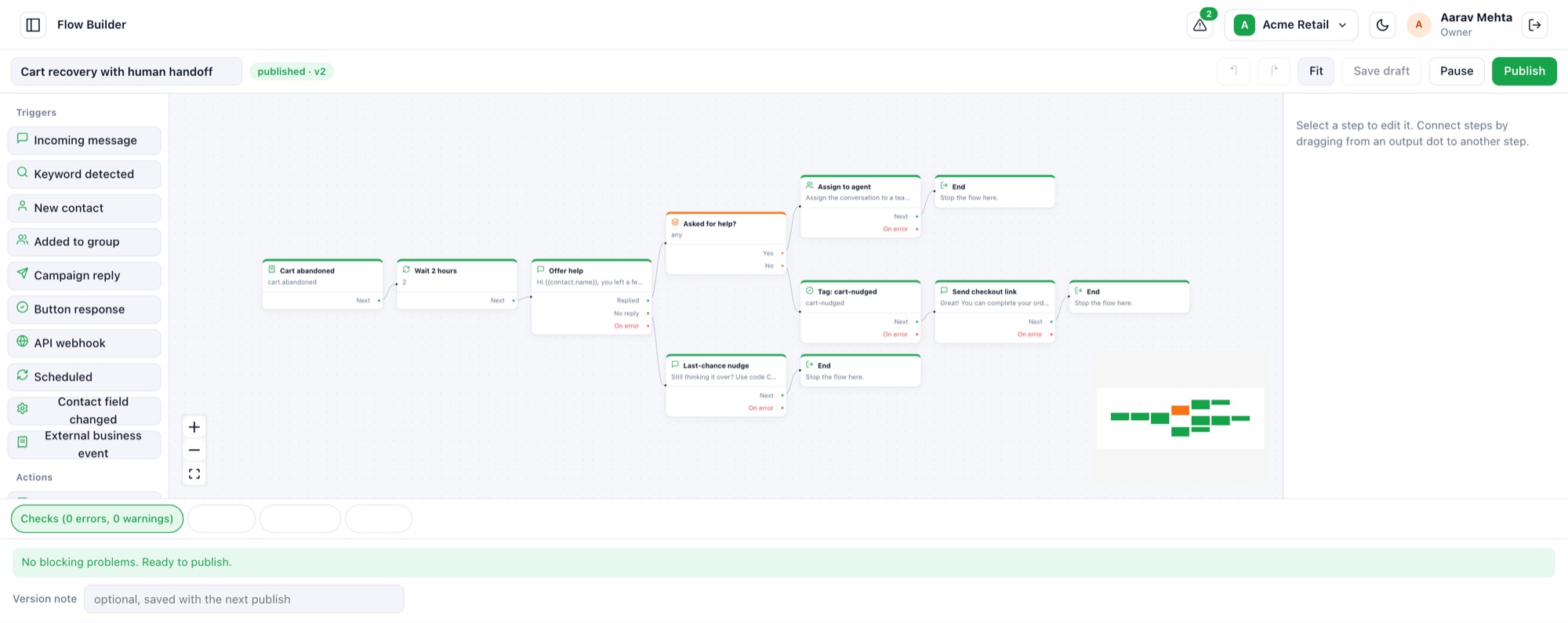
A cart-recovery flow with a delay, a question, a branch and a human handoff.
- 1Palette of steps
Triggers, actions, logic and AI steps you can drag onto the canvas.
- 2Start from a trigger
Here an event from your store starts the flow when a cart is abandoned.
- 3Branch on the reply
Route customers who ask for help to a person, and everyone else down another path.
- 4Checks before you publish
Errors and warnings are listed so a broken flow never goes live.
- 5Publish with versions
Publish, pause and restore earlier versions at any time.
Describe it, then refine it
Write what the automation should do in plain language. The platform improves your description into a professional brief, builds the complete flow, and opens it in the editor for you to review and change.
What you can build
- Welcome and lead-qualification flows that tag and notify your team
- Keyword and button-driven menus
- Reminders, follow-ups and scheduled messages
- Branching on replies, with timeouts and human handoff
- Calls to your own systems over HTTPS
Frequently asked questions
Do I need to code?
No. Flows are built visually, and you can have AI generate the first version.
Can a human take over?
Yes. Flows can assign the conversation to an agent or escalate with a note.
Start sending on WhatsApp today
Connect your WhatsApp Business Account and launch your first campaign in minutes.