
Shared Team Inbox for WhatsApp
One inbox for every WhatsApp conversation, so nothing gets missed and everyone knows who owns what.
See it in the Inbox panel
A three-column workspace: your conversations, the chat, and everything about the customer.
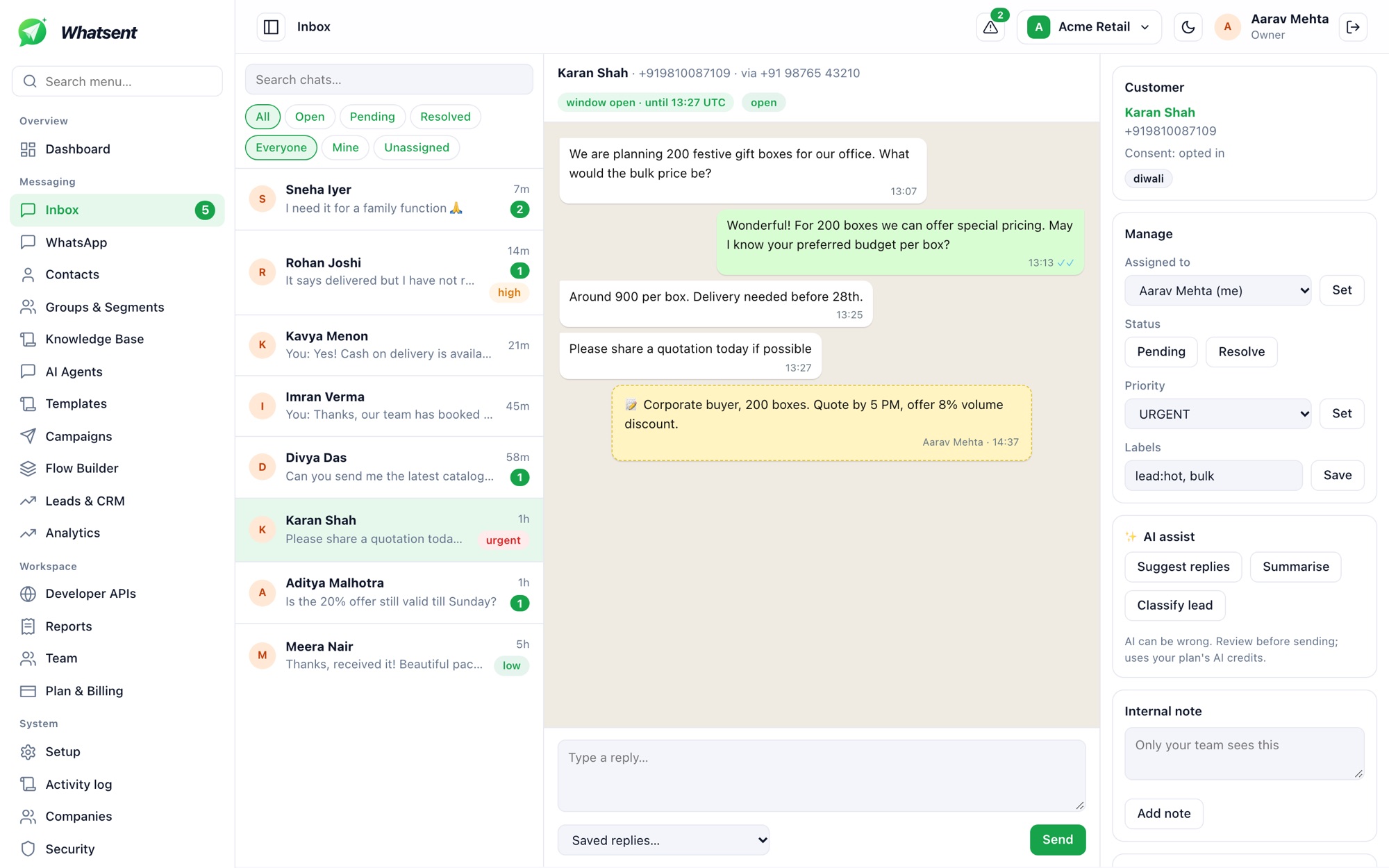
- 1Unread counts and priority
See what needs attention first, with unread badges and priority tags.
- 2Filters for the whole team
Switch between open, pending and resolved, and between everyone, mine and unassigned.
- 324-hour window indicator
Know whether you can reply freely or need an approved template.
- 4Private notes
Leave context for teammates in the thread. Customers never see it.
- 5Assign, prioritise, label
Hand a chat to a teammate, set its status and priority, and add labels.
- 6AI assist
Suggest replies, summarise the chat or classify the lead. You review before sending.
- Assign conversations to teammates or share them across a team
- Add private notes that customers never see
- Use labels and filters to prioritise
- Restrict team members to specific WhatsApp numbers
- Suggested replies and conversation summaries from AI, always reviewed by a person
Replies inside the 24-hour window are free-form; outside it, send an approved template to restart the conversation.
Start sending on WhatsApp today
Connect your WhatsApp Business Account and launch your first campaign in minutes.